Artec 3D has announced the availability of Artec Studio 16 (AS16), the newest iteration of its award-winning 3D scanning software, and Artec Cloud, a collaborative platform that allows users to access, view, comment on, and process 3D scan data online. The integration of AS16 and Artec Cloud streamlines 3D project management. Users can upload and share 3D data with peers, leave comments, send photos, and have full conversations. With Artec Cloud, users can also process 3D scans in their browser from any location and from any computer, without being constrained by the technical limitations of their devices.
“Thanks to our major software releases, every year our professional 3D scanners are becoming faster and more powerful and therefore are capturing more data than ever,” said Artyom Yukhin, President and CEO of Artec 3D.
“Our development of industry-leading software solutions and AI-powered algorithms is critical for enabling the 3D scanning industry to reach new heights. The release of Artec Studio 16 and Artec Cloud equips users with unprecedented collaboration opportunities, flexible workflows, faster 3D data processing, and numerous feature-rich tools to meet any need.”
New Features for Inspection: Scan-to-CAD Now 8x Faster
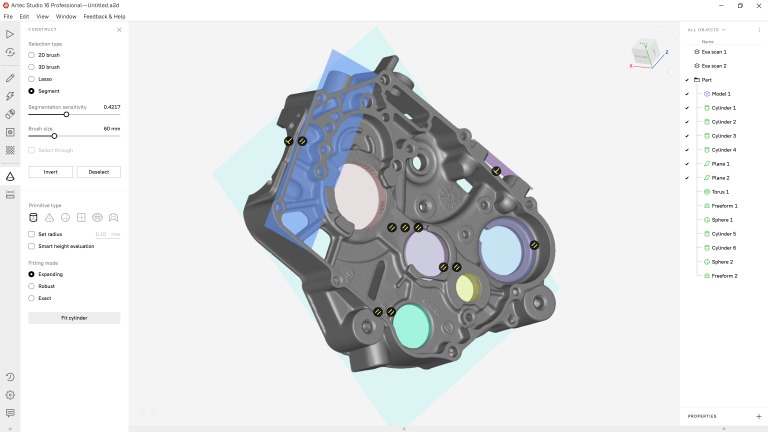
Components and products can be inspected right in AS16 and via a seamless Control X integration. An uninterrupted scan-to-inspection workflow allows users to finish a scan, inspect a mesh, or run inspection in CX from Artec Studio. Users can even conduct batch CX inspections. In Artec Studio’s own inspection tools, scan-to-CAD alignment is 8x faster, and distance mapping measurement calculations on complex CAD models are generated 70% faster. When working with primitives, users can now force constraints to further optimize quality inspection results. Precise point-to-plane measurement of perpendicular distances can be conducted with a few clicks, making it easy to calculate precise thicknesses or define external dimensions.
New Scan-to-CAD Tools for Reverse Engineering
Tailored freeform primitives enable users to create custom-fitting primitives for curvilinear surfaces. Constraints ensure that primitives fit to your scan will snap into place and be ready for export – which can be done directly to SOLIDWORKS, without a plug-in. AS16 also features CAD-perfect sections from constructed planes, and a new torus primitive has been added for reverse engineering ring-shaped objects.
AI-Powered HD Mode Enhancements: Acquire HD Data 2x Faster
Artec 3D’s neural network-based
HD Mode for Eva and Leo handheld 3D scanners has been greatly enhanced in AS16. HD projects can now be reconstructed nearly 2x faster, and the size of HD projects are nearly 20 percent smaller. Scan data can also be stored and processed at a later time, or on a stronger computer, if needed. New encrypted file formats let users export and store high-def data from Leo onto an SD card.
Photorealistic Texture for CGI: Combining Scan & Photogrammetry Data for the Best of Both Worlds
AS16 allows users to combine scan data with photos for creating high-accuracy models with photorealistic texture. Photos taken with a professional camera, or even from a mobile phone, can be uploaded into Artec Studio, and users can easily build and map texture onto the mesh captured with an Artec Leo, Eva, or Spider. The alignment by scale algorithm allows users to match the arbitrary scale of a model created with photogrammetry to the real scale of a model captured with an Artec 3D scanner by checking a box and aligning three points.
Boosted Speed & Ease of Use
Projects load at least 10x faster in AS16, bringing down the loading average for a project to just 10 seconds. Users also no longer need to wait for scans to be fully loaded before working with the data. Project progress is kept safe with automatic saving, providing peace of mind to users. Smart RAM optimizer automatically loads essential data and unloads data that isn’t being used, creating a faster, smoother workflow.
For more information:
www.artec3d.com

 Tiếng Việt
 Tiếng Anh
 Tiếng Hàn
 Tiếng Trung